
Protect their faces before you share
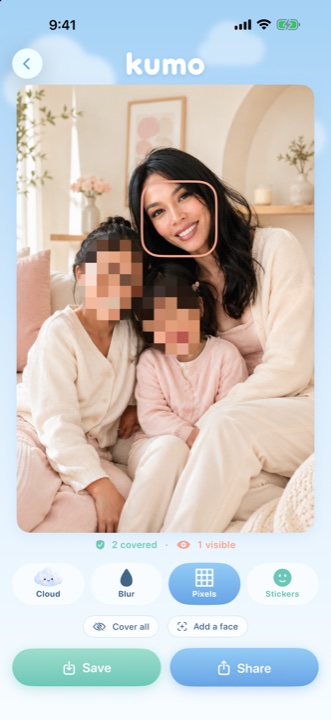
Kumo automatically finds every face in your photos and videos — even far away in the background — and covers it with a soft blur, pixels, or a cute sticker fitted to the face. In one tap. Everything happens on your iPhone. Nothing is ever uploaded.
Free to use · Premium unlocks HD, unlimited video & all stickers


Faces covered, the moment stays
A real video, analyzed and covered on the iPhone — then the same photo with pixels and stickers.

Everything you need to share safely
Made for parents who want to post moments — without exposing their kids.
Faces found automatically
On-device detection instantly locates every face. Tap to include or exclude anyone — you stay in control.
Blur, pixels or stickers
Choose a soft blur or pixels that follow the shape of the face, or a cute sticker from a whole collection — fitted and placed on each head, a different one for each face. Cute enough to keep, private enough to share.
Videos, even on the move
Kumo follows each face across the whole video — when kids run and jump, and when you pan or zoom. Small faces far in the background are found too.
Private by design
100% on your device. No servers, no uploads, no account. Faces are never recognized or stored — only their position, briefly, to place the mask.
Three taps and you're done
Pick a photo or video
Choose any moment from your library.
Faces get covered
Kumo hides them automatically — adjust anyone you like.
Save or share
Export the protected version and share it anywhere.
Your family stays yours
Kumo was built on one promise: what's on your phone stays on your phone. There are no servers and no internet connection is needed. We never see, store, or upload your photos, your videos, or any face data.
- No photo or video ever leaves your device
- No facial recognition — only face position, in memory, to place the mask
- No account, no analytics, no advertising, no tracking
- Nothing is retained — exports are flattened and irreversible, with location data removed
Frequently asked questions
How do I blur faces in a photo or video?
Is Kumo free?
Does Kumo work on videos?
Does Kumo find small faces in group photos?
Are my photos or videos uploaded anywhere?
Does Kumo use facial recognition?
What devices does Kumo support?
Share the moment, not their identity
Join the parents protecting their children's privacy with Kumo.
Get Kumo — free